Home/Products/Invoice Generator

Free invoice generator.
Create and download PDF invoices, No signup.

Type directly onto the invoice, save the services you bill every month, and download a clean PDF. Free, no signup, no watermark.

Loading the invoice builder…

Everything happens in your browser — your invoice, client details and saved services never leave your device.

Invoice ready.

A PDF invoice still needs chasing. Send it through EverBird to see when it's opened and let the follow-up emails write themselves.

How it works

Five steps from blank page to a PDF you can send.

1
Add your details
Click the header to set your business name and logo, then fill in the From and Bill to fields.
2
Add the services
Pick items from your saved catalog, or type a new line and save it for next time.
3
Set rates, quantity and tax
Totals calculate automatically in your currency.
4
Add the invoice details
Due date, PO number, bank transfer or IBAN, payment link, terms, or a note to the client.
5
Download the PDF
Clean, watermark-free and ready to email.

No signup, no watermark, unlimited invoices — the invoice is the form, and what you see is what downloads.

Direct editing

How is this different from other invoice generators?

Two things: you edit the invoice directly, and you save your services.

Most free generators put a form on the left and a preview on the right. You fill in fields, hit generate, and hope the result looks right. Here the invoice is the form; click any line and start typing. What you see while editing is exactly what downloads.
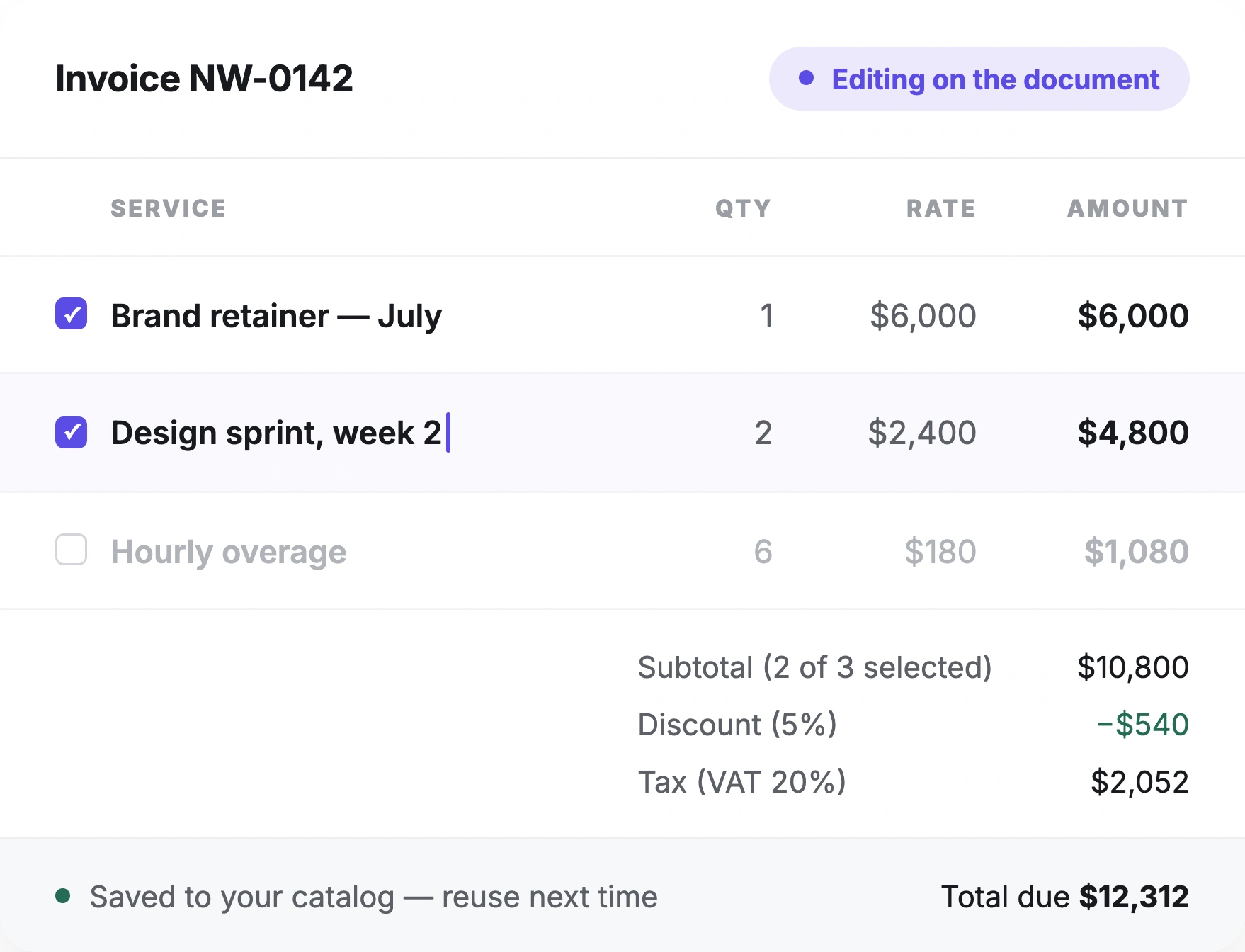
Invoice being edited directly on the document: line items with checkboxes, an in-place text caret, and live subtotal, discount, tax and total

Scope

What it does, and what it doesn’t.

It does

Direct on-document editing — no separate form
Saved items catalog with reusable services and rates
Drag-to-reorder blocks; remove any block you don't need
Per-line tax, quantity and rate with automatic totals
Logo, custom invoice number, due date, reference
Bank transfer details (IBAN, SWIFT) and payment links
Terms, shipping details, notes, late-fee text, custom blocks
Unlimited invoices, watermark-free PDF, no signup

It doesn't

Track whether the client opened the invoice
Send the invoice or chase the follow-up
Sync invoice history or a client list across devices
Number invoices sequentially on its own
Handle recurring or retainer billing automatically
Reconcile payments or sync with your accounting software

EverBird does those. This tool is deliberately a document builder.

How it compares

How it compares to the other free generators.

Feature
invoice-generator.com
Zoho Invoice (free)
Wave
EverBird
Signup required
No
Yes
Yes
No
Watermark
No
No
No
No
Edit directly on the invoice
No (form + preview)
No
No
Yes
Saved service catalog
No
Yes (account)
Yes (account)
Yes
Add/remove/reorder blocks
Limited
Limited
Limited
Yes
Files stored on a server
Yes
Yes
Yes
No
Invoice limit
Unlimited
1,000/yr
Unlimited
Unlimited

Publicly listed features as of August 2026.

Entire client lifecycle

When you need more than a PDF.

This tool builds and downloads the invoice. It won't tell you when the client opened it, won't send the reminder on day 15, and won't remember that the retainer needs billing again next month.

EverBird will. It's follow-up software for agencies and service businesses: send invoices and proposals from your own email address, run reminders on a schedule you set, and see recovered revenue and how many days faster you're being paid.

See how EverBird follow-ups work 

Common questions

Everything you’re wondering about the invoice generator.

No. No signup, no email address, no card. Open the page, build the invoice, download the PDF.
No. The downloaded invoice carries no EverBird logo and no “created with” line.
Yes. Pick your currency, add IBAN and SWIFT/BIC for international transfers, and use the Details section for any reference numbers your client's bank requires.
The catalog is stored in your browser, so it stays on that device and in that browser. Clearing site data or switching machines clears it.
The PDF is final once downloaded. Rebuild it in the tool and download again — with the saved catalog that takes seconds.
Save the retainer as a catalog item and add it each month. If you want it sent automatically, that's recurring billing in EverBird.
Set the number manually in the header. A common agency convention is a per-client prefix, like NW-0142. Keep them unique and sequential for your accountant.
Yes. Save an item once — description, rate and tax — and add it to any invoice with a checkbox instead of retyping it.
It's built for them: retainers, milestones, hourly overage, PO numbers, VAT and bank details are each a block you can add, reorder or delete.
Your details and the client's billing contact, a unique invoice number, issue and due dates, payment terms, itemised services with quantity, rate and tax, the total due, and how to pay. Add the PO number if the client issued one.
Yes. Tax is set per line item, so mixed-rate invoices calculate correctly. PO number, reference and dates live in the Details section.
No. The invoice is built and rendered in your browser. Client names, rates and bank details never reach us.
Yes. The Bank transfer block holds bank name, IBAN or account, SWIFT/BIC and routing number; the Payment link block takes any Stripe, PayPal or custom checkout URL.
Portrait of Jose, Co-Founder & CEO, EverBird.ai
Jose
Co-Founder & CEO, EverBird.ai

An engineering and consultancy background in oil & gas, where he delivered over $2B in projects with teams that lived and died by contracts, sign-off, and paperwork moving fast. He saw firsthand how much revenue stalls waiting on a signature nobody chased. Good work sitting unpaid because a document went quiet in the middle and no one noticed for a fortnight.

Last updated: August 2026

EverBird.ai

Everbird spots who’s stalling, decides when to follow up, and writes the message that closes the deal — automated client follow up software with one link for all client documents.

Pre-register · Founders’ Circle open
Company
StoryResearchBlogPrivacyTerms
Talk to the team

Our community is built into EverBird, and yes, we answer every email ourselves, always.

Contact us →
© 2026 Kinsei Lab. All rights reserved.